These are projects posted by the students of Dr. Gove Allen at Brigham Young University. These students have taken one semester-long course on VBA and generally have had no prior programming experience

Thursday, December 10, 2015

Altman Z-Score Comparison by Stock Ticker

This project is to be used by a buy side analyst looking to take a short position in a company. Short sellers make their money off of other companies ill fortune. Bankruptcy is one of those ill fortunes that can beset a company. The Altman Z-Score is a model developed by a scholar, which takes into account various financial measures and computes a z score or measure of whether or not bankruptcy is likely. This tool takes as its input a stock ticker, and from that ticker looks up all of the various financial measures necessary and then gives you the z score as the final result so that you can know whether or not a specified company is on the road to financial destruction.


First Class Cars - Credit Cards


Executive Summary

The Problem:
I work for a small, tax company. We mainly focus on doing tax returns for our clients. However, we also keep the books for a few clients. One such client, First Class Cars, has a great deal of credit card information to sort through at the end of the year. They use their credit cards for both work and personal use, so sorting through the purchases and deciding which account to put the purchase towards is difficult. In the past, this process has been VERY time-consuming – usually taking days to complete. I wanted to streamline the process. 

The Solution:
One of the previous co-workers did a great job making a macro for ONE of the credit cards. However, it wasn’t something transferable between credit cards. It dealt specifically with information pulled from the one credit card’s online information. First Class Cars has over a DOZEN credit cards – probably close to 20 –I’ve created something that can be used on ALL credit cards. This involves an all-in-one user form to work through the information. The form has 3 tabs. One for processing the vendor information to determine the appropriate account number to use. Another to add new vendors. And the last one to format the data to import into our accounting software, Certiflex. I also created a "Clear Form" macro to simplify the process of starting a new credit card.

Home Teaching Tool


EXECUTIVE SUMMARY
PROBLEM:
 Currently I am a home teaching supervisor in my Elders Quorum in my ward. I am in charge of gathering the reports for my district on whether or not they completed their home teaching as well as if there are any other concerns the Elders Quorum Presidency should know about such as if the family is struggling. As I was trying to fulfill my responsibility I found that there was no good way to group all of the contact information to make it easy to obtain these reports. The only thing I was given was a pdf of who my district members were, their companions, and which families were being taught. There was also no way to digitally enter in home teaching reports, they were to be printed out and filled out manually.
SOLUTION:
 My solution I have implemented is a tool designed to create groups and companionships to organize the contact data in a way that is easy to view. Along with this, I wanted the tool to be relatively easy to change group information. For this reason, I worked specifically with the format that is used by the LDS church for a ward list. The tool is designed so that it can be updated by a new ward list without erasing all the data. It also allows data about which families were taught to be retained even if groups or companionships change or if the ward list changes.
 I also wanted a way to contact each group in a mass email both using this tool as well as creating a google import list to create the group on google contacts so that a person can contact the entire group on the fly. In addition to making it easier to contact the Elders, I wanted to make it easier to create a report where I could fill out home teaching results.
SYSTEM OVERVIEW:
The system is essentially a list of worksheets that each act as their own database. First a ward list from the LDS Church is imported. The crucial data from the ward list is copied into the tool and acts as a repository for the rest of the data. With the data in place, the tool allows the user to create groups within individuals from the ward list. Once there are groups, the user can edit group memberships. Companionships can be added to groups and are made up of two individuals and the families they teach. Companionships’ families can be edited. Both groups and companionships can be edited and deleted. The system also allows for mass emails to whatever group the user chooses. Once the groups and companionships have been formed, the user can then generate a report where home teaching can be recorded. Lastly, I included a function that transfers the data captured in the report and saves it to another worksheet so that data can be preserved even if groups or companionships change.

Below is the ribbon that outlines the main features of my system.

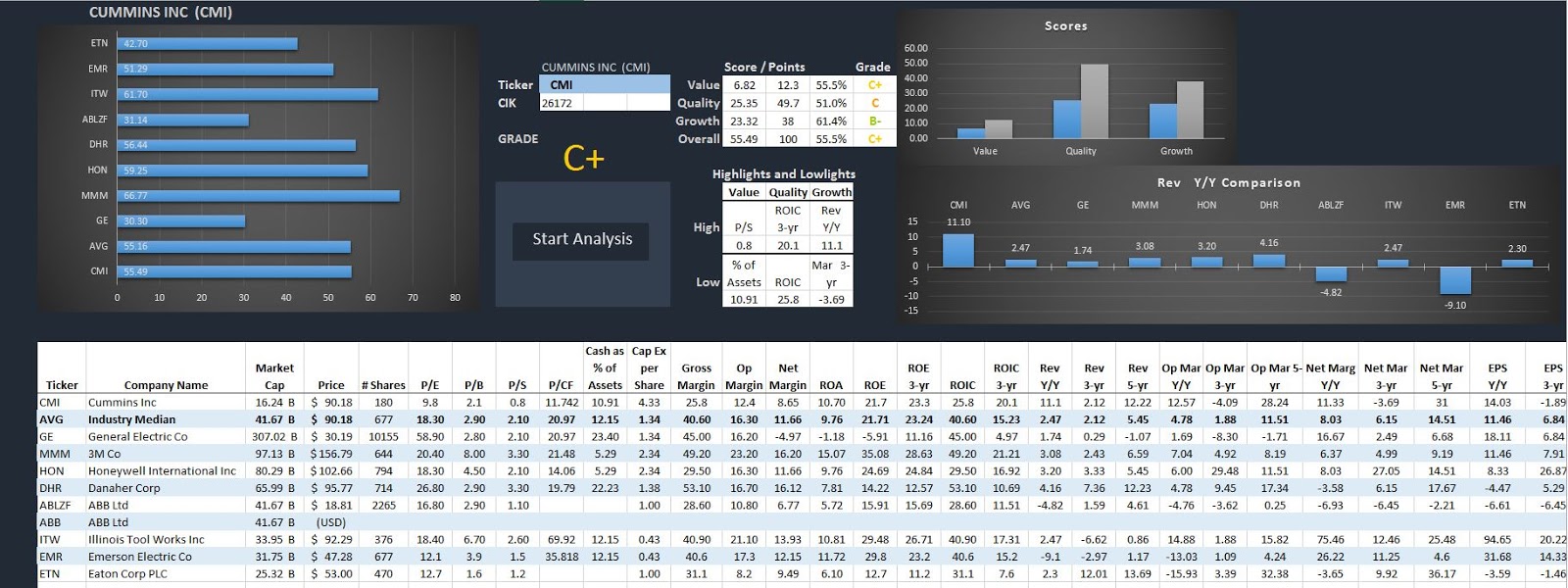
Locating Your Stock on a Bell Curve - Stock Skywalk


The Problem:
I worked for a hedge fund that managed around $20 million, which they invested into stocks and bonds.  This hedge fund insisted that Morningstar and Bloomberg had too many errors in their financial data.  Therefore, the hedge fund required analysts to manually input the financial statement data. The manual input process could take 3-5 hours for any particular company, and the manual input often had errors as well.
For promising investment opportunities, the hedge fund would analyze comparable investments to ensure the subject company was superior to peers.  This process required the input of additional data for the comparison companies.   The hedge fund often looked for the same desirable performance indicators from the financial data.  The repetitive nature of this work makes it a prime candidate for automation.
                                                                                  The Solution:
The goal was to create a tool that takes the ticker entered, finds relevant comparable companies, and downloads all the financial data for those companies.  The tool then ranks those companies in comparison to each other—this allows the user to ‘walk above’ hundreds of ratios for each company and quickly make decisions.
The program I created is called Stock Skywalk.  The program downloads financial data from Morningstar and the SEC website.  The program creates a normal distribution of similar companies, and ranks them compared to each other.  The data is then displayed using graphs and a familiar grading system that allows users to visually see the end results after barely one minute.

Stock Skywalk uses Morningstar to select 5-20 comparable companies for the ticker entered. Each company is ranked based on 27 ratios.  The program creates a normal distribution based on the sample of companies, and ranks each company on each metric.  The individual metric scores are then combined for a total score for each company.  

Files:
  

Wednesday, December 9, 2015

Reconciliation Preparation

Executive Summary

This program was created to assist Brigham Young University’s dining services accounting department in their monthly inventory reconciliations. There are two main software programs that dining services to account for their inventory:  Eatec and Peoplesoft. When food is delivered to the various locations on BYU campus, the locations receive invoices on the deliveries. All of the invoices get sent to the accounting office where they are put in the Eatec system. With the information given in the invoices, Eatec keeps track of all the inventory in each department. For example, when sales are made and physical counts of food are done in the cafeterias, these amounts get put into Eatec, where Eatec will then deplete the inventory in the cafeteria. Peoplesoft, on the other hand, is the software that handles all the payments and money balances for dining services. When invoices get put into Eatec, Eatec initiates payment requests that are finalized on Peoplesoft. Peoplesoft should essentially mirror the transactions Eatec makes so the inventory balance on Eatec and the financial balance on Peoplesoft should ideally always be the same.

The reason for reconciling the Eatec balance to the Peoplesoft balance each month is because the two balances are never the same. Eatec transactions occur that do not get followed through on the Peoplesoft side. For example, sometimes Eatec may put an invoice in for the Cannon Center department but Peoplesoft processes a payment coming from the Creamery on Ninth. Sometimes, an invoice will be put into Eatec and due to the supplier, will not automatically go into Peoplesoft. In this case employees from other departments will have to manually put the transaction into Peoplesoft for payment. Oftentimes these transactions are put in incorrectly or not at all, causing imbalances.

Every month a long workbook of data is prepared that has every single transaction that is not matched up on both the Eatec and Peoplesoft side. The employees are asked to look at all the unreconciled transactions by department and identify the cause of the problem. When I first started working here, preparing the data by separating the transactions by department was nearly as time consuming as the reconciliation process. This macro will take the monthly reports and create a workbook for a specific employee and their designated departments.

Certified Medicaid Services File Converter

Medicare Part D is a prescription drug benefit that Certified Medicaid Services subsidizes for applicable health plans.  Their tight regulations and requirements, make it essential for Part D Sponsors to be able to convert CMS Files and provide up to date reporting on a regular basis.  As of today, CMS has not issued any tool to convert their files into manipulative data. 

CMS Conversion/Reporting Tool

The System I have built has three major components

1)    Conversion of CMS Files
2)    Reporting with real time Enrollment Data
3)    Reconciliation of CMS Files

Conversion of CMS Files

The system has built in the formats of various CMS files that are needed for CMS reporting.  Once the file has been transferred into the shared file location, the system will allow the user to select the file from a file directory.

Reporting from Real Time Enrollment Data

The system will allow the user to access the Enrollment Data tables and create reporting based on the information available.  There are two reports already built in, which are the “Enrollment Report” and the “LEP Report.”  There is also a way to customize a report by using the SQL Assistance form.

Reconciliation of CMS Files


Another benefit to the system is the ability to reconcile CMS Files.  It will aggregate all of the necessary inputs and reconcile the accumulated amounts between reports.

ACC 520 Excel Folder

Credit for Small Employer Health Insurance Premiums

Moss Adams, LLP is a regional accounting firm that is based in Seattle, Washington with offices up and down the west coast. Moss Adams’ main customer base is comprised of small to medium sized companies that oftentimes have fewer than twenty-five employees. Many of these clients qualify for a tax credit called the Credit for Small Employer Health Insurance Premiums. This credit is for taxpayers that provide an employer sponsored health insurance program for its employees and their dependent families. Unfortunately, the credit is very confusing and has many nuances that make it difficult for the tax preparer to calculate the credit. The benefit of the credit is oftentimes negated because of the cost it takes to calculate the correct amount of the credit available. This VBA program is designed to simplify the credit calculation, in turn saving money for the client.

In order to calculate the credit, information must be input into the program by both the Moss Adams professional and the client. The program allows the Moss Adams professional to input client tax information and then password protect the information so that the client cannot inadvertently change information. The client is given access to a limited number of worksheets where they will be able to upload employer and employee information needed in calculating the credit. The program fills in each line of the Credit for Small Employer Health Insurance Premiums (Form 8941) so that the Moss Adams professional need only input the form into their tax preparation software.


• http://files.gove.net/shares/files/15f/mgood/FInal_Project_-_Marshall_Goodrich_Form_8941.xlsm
• http://files.gove.net/shares/files/15f/mgood/Final_Write-Up.pdf
• http://files.gove.net/shares/files/15f/mgood/Moss_Adams_Client_8941_Template_Instructions.docx
• http://files.gove.net/shares/files/15f/mgood/Moss_Adams_Professional_8941_Template_Instructions.docx

Finding Patterns in Customer Data of Online Page Visits

TaxHawk is an online tax filing service here in Provo and this semester they ordered an On-Campus Internship to preform statistical analyses to determine what makes a user of their service either complete their taxes or abandon the process before completing.  One of the things they wanted us to examine is if any of the order pattern in which users hit the pages had any statistical significance. This is the problem I attempted to answer. They gave us data from users and the order they hit each page and I created a Visual Basics Sub Procedure that compares each user with all other users in the data set and finds any common patterns in the order they hit the pages. The Sub Procedure asks for a csv file containing user data, then finds the patterns among the users included in that sample, and finally returns a csv file including a list of all users and the found patterns marking the users that followed the patterns.


Tuesday, December 8, 2015

Trophy Store - Quarterly and Monthly QuickBooks Comparison Form

Crown Trophy is the biggest franchiser of trophy stores in the nation and currently there are 142 stores located around the country. Crown Trophy focuses on providing high quality awards and recognitions to corporations and athletic groups. My father owns two of these franchises located in the Austin and San Marcos area. One of the main pain points that he experiences in managing his franchises, is the amount of time it takes to pull and organize QuickBooks data into a usable form. To aid with this problem, I developed a program that will easily pull in data from a QuickBooks report and format it for any number of Crown Stores.


            Formatting the data includes cleaning up the original report and only pulling in the correct line items and summations. This is accomplished through interaction with various user forms until the data is displayed by store and by the correct time period. I wrote two different codes for pulling in the two different time periods which are monthly and quarterly. New stores can be added or edited at any time. After the reports have been imported into my program the user can select to create a bar chart of any of the line items and compare these to the projected numbers for the same store and time period.  

BYU Tuition Estimator VBA Program

BYU Tuition Estimator

By Bryce Palmer

I am a Masters of Information Systems Student at BYU. I found that there was not efficient and intuitive way to run estimated calculations of how much tuition I would be paying at the end of the semester or term. Because of this issue, I decide to use my skills that I learned in Dr. Gove Allen’s VBA Class to build a program to complete this simple task for me.

My VBA solution is composed of an Excel UserForm that accepts 4 inputs from the user and determines the estimated tuition. The tuition charges are updated yearly by BYU and are posted online similar to this page. I have created an Excel Module to download these tables of data and extract the rates to make the calculations. After the user submits their estimated credit hours and other inputs the program will calculate the estimated tuition and display that on the UserForm.

Blog Archive